Friday, 7 May 2010

Rendering

The duck walking in was the first render I did. When I saw the finished result I was very happy. It took four hours to render this scene. For this I knew I had to be quick with the animation because the rendering would take a very long time and I wouldn't have the time to finish. Other renders took a very long time. The longest render took 17 hours to complete 560 frames. This meant that I had to continue rendering through the night.


This image shows how many renders I had to do to make sure I had everything I needed to start video editing. Each render took a minimum of 4 hours. Some even took 17 hours.

Cameras

The cameras came very useful during the animation and rendering. Once I knew the camera angle I wanted to render from I set a camera in the view and then pressed P on the keboard to come out of it and carry on editing. It also came in useful when more then one camera was needed on a file with more than one render needed. Below shows a file which had two cameras and it shows how I used them.

Visability Tool

One tool which came in very handy on many occasions was the Visability option. On many occassions I needed objects to disappear and reappear. This particularly came in very handy when making the characters blink. I could do this by adding a track and setting it to disappear at certain points on the timeline and then reappear later. This also came in very useful for when the characters were thinking. Look at the print screen below to see how I achieved this effect.

Footsteps

Footsteps were the most difficult part of the animation to do. I used the footstep mode to create footsteps for the characters to walk and run. I also used the convert tool to make sure I could edit the strides and the body posture. For the mouse I had to continuously bring the footsteps together because it kept on walking on its knees. For the elephant it would throw it's arms in towards its body. Because of this I had to make separate layers for his arms to make sure they were not hidden inside its body. The duck was the easiest to make walk because the only thing it did wrong was throw its arms inwards. The elephant was definatly the hardest as during the footsteps it kept bending its knees backwards and throwing its legs in random places. I solved this by using the convert tool and frame by frame, made sure that this would no happen.

Moving objects

This was by far the easiest animation I had done throughout the project. To make the characters look like they were running without making them move a lot. I simply grouped the background and set autokey. I then made a keyframe at 0 and moves the slider to a particular number when the charcter had stopped moving. I then moved the background to its finishing position. This was all i needed to do.


Animating

When I started animating, it was very difficult I had never animated before so it was very new to me. I had to make sure it was all done properly because the modelling looked really good and I did not want to make it look Bad at this stage. I thought the animation was fairly easy to do after I was shown how to do it. However, I wish I had experience of animating before I started the project because I if had experience in this then I would have done many things different during the modelling. Every stage of making this is very important and needs to be considered all the time.

Thursday, 6 May 2010

Extra Scenery Items

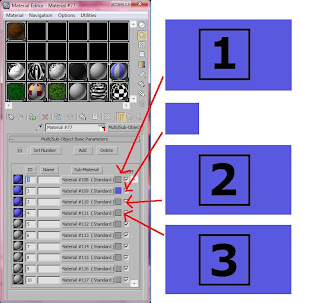
After I thought I was finished with the scenery I remembered I had a scene where it needed to show that the mouse had won. For this I would need podium and a winning trophy. I knew this would not be difficult to do because of the experience I had gained from so much modelling. Firstly I made three boxes and then assigned a UVW map to them. I had to make sure each of the boxes were a different height. I then assigned a material to them which was 'sub/object element' which allowed me to set different materials to each polygon of the boxes.
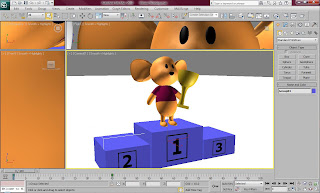


This is the material I used for the podium. The diagram shows how I produced this.


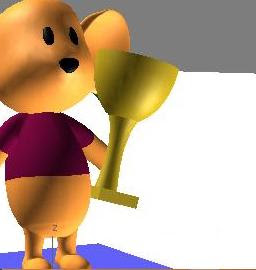
This is the trophy that I produced. I is made out of simple shapes and a half sphere. I made the colour yellow to show that it looks like gold.


This is an image I used for the material. The other materials had other numbers on them.